
Grove
macOS 原生 Git 客户端。四栏一屏铺开——工作区与分支、提交历史、变更文件、diff 详情, 从看提交到暂存提交不用切页面。
A native Git client for macOS. Four columns on one screen — worktrees and branches, commit history, changed files, diff detail. Review and commit without switching views.
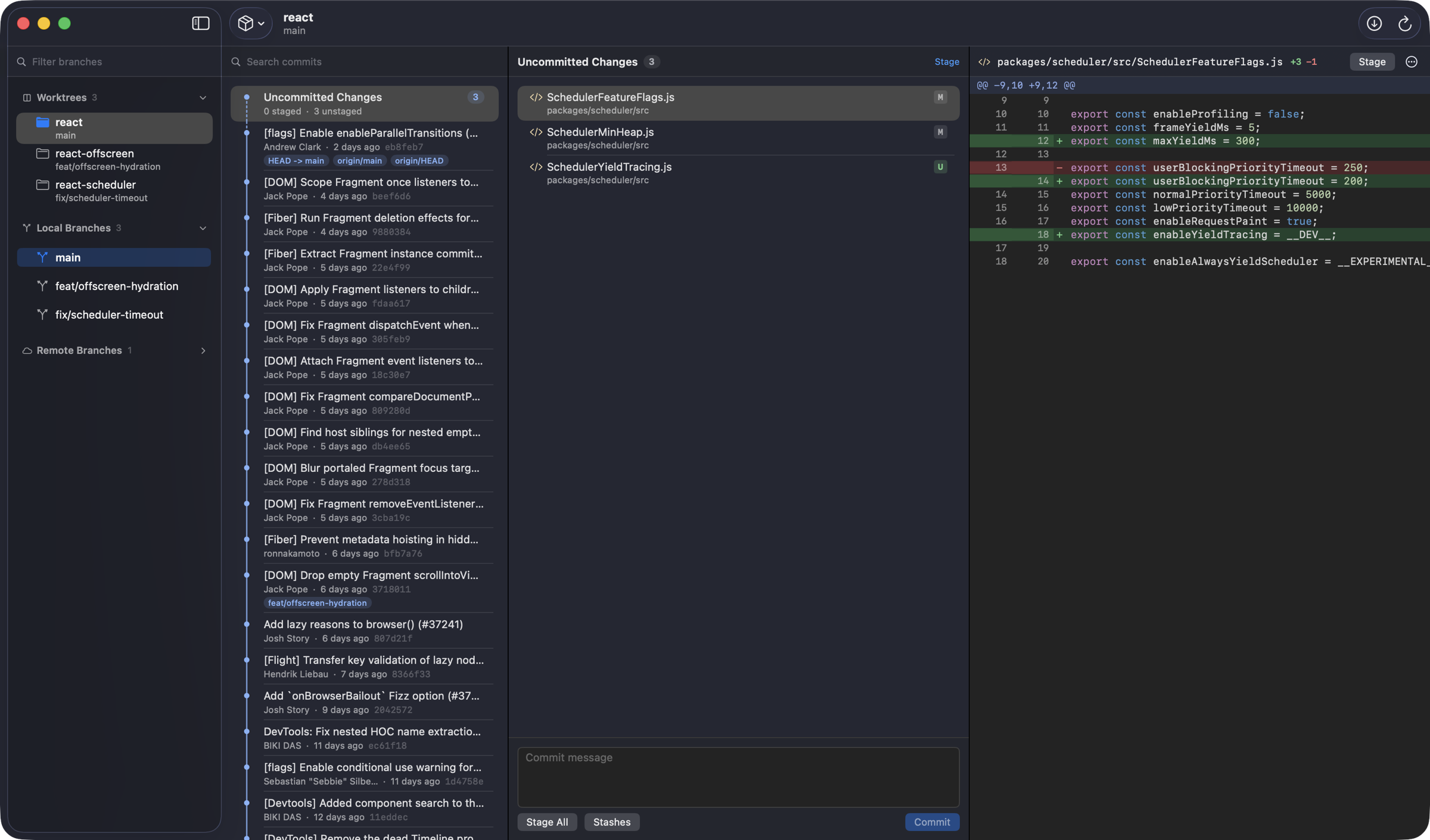
macOS 原生 Git 客户端。四栏一屏铺开——工作区与分支、提交历史、变更文件、diff 详情, 从看提交到暂存提交不用切页面。
A native Git client for macOS. Four columns on one screen — worktrees and branches, commit history, changed files, diff detail. Review and commit without switching views.
它解决什么
What it fixes
大多数 Git 客户端把 worktree 当成边角功能藏在菜单里。Grove 把它放在第一栏。
Most Git clients bury worktrees in a submenu. Grove puts them in the first column.
第一栏直接列出所有 git worktree,点一下就切过去,bare / detached / locked
都有标识。已经被别的 worktree 检出的分支单独标色,不会误检出。关掉再打开,
回到上次停留的那个工作区。
Every git worktree is listed in column one — one click to switch, with
bare / detached / locked all marked. Branches already checked out elsewhere are
color-flagged so you can't check them out twice. Reopen and you're back where you left off.
「未提交的变更」固定置顶,下面接着就是提交历史,没有标签页要切。 工作区干净时它自动消失。
Uncommitted changes pin to the top, commit history follows directly underneath — no tabs to switch. The section disappears on its own when the tree is clean.
双列行号、增删分色、语法高亮——配色直接取自 VS Code 的 Light+ / Dark+ 主题, 跟着系统深浅色走。支持自动换行、忽略空白差异。
Dual line numbers, color-separated additions and deletions, syntax highlighting — the palette comes straight from VS Code's Light+ / Dark+ and follows your system appearance. Soft wrap and whitespace-insensitive modes included.
暂存、取消暂存、撤销都是乐观更新,界面立刻响应,随后用真实 git status 对账。
仓库文件有变动时会自动静默刷新,不用手动点。
Staging, unstaging and discarding apply optimistically — the UI responds instantly,
then reconciles against real git status. The view refreshes silently
whenever files change on disk.
实测
Measured
在一个真实的大仓库上测得,不是空仓库跑分。
Taken on a real repository of that size — not an empty benchmark.
| 环节Operation | 耗时Time |
|---|---|
| 打开一个文件的完整 diffOpen a file's full diff | 60 ms |
| 解析 8000 行 diffParse an 8,000-line diff | 19 ms |
| 单次 git 调用固定开销Fixed overhead per git call | 21 ms |
| 暂存一个文件后刷新Refresh after staging a file | 153 ms |
界面
Layout
列出 worktree 并一键切换,右键可移除或清理失效记录;本地与远程分支带当前分支、 上游、ahead/behind、上游 gone 标记;双击检出,底部实时过滤。
List and switch worktrees in one click; right-click to remove or prune stale entries. Local and remote branches show current, upstream, ahead/behind and gone-upstream marks. Double-click to check out; filter live from the bottom bar.
提交显示作者、相对时间、短 SHA、分支与 tag 标签,合并提交可展开看带入的提交; 按提交信息搜索走全量历史;⌘1 跳到未提交的变更,⌘2 跳到最新提交。
Commits show author, relative time, short SHA, branch and tag labels; merge commits expand to reveal what they brought in. Search runs over full history. ⌘1 jumps to uncommitted changes, ⌘2 to the latest commit.
按冲突 / 已暂存 / 未暂存 / 未跟踪分节,每节可批量暂存,底部就是提交信息框; 文件按 A/M/D/R/C/U 标注,重命名显示来源路径。
Grouped into conflicted / staged / unstaged / untracked, each stageable in bulk, with the commit message box right below. Files are marked A/M/D/R/C/U; renames show their source path.
未跟踪文件按新增展示,二进制、纯重命名、仅权限变更都有对应提示, 大 diff 延迟渲染。
Untracked files render as additions. Binary files, pure renames and mode-only changes each get their own notice. Large diffs render lazily.
终端
Terminal
子目录和文件路径都会解析到仓库根。App 已在运行时不会新开进程,而是让当前窗口切过去。
Subdirectories and file paths resolve to the repository root. If Grove is already running, it switches the current window instead of spawning a new process.
$ grove                  # 打开当前目录所属的仓库
$ grove ~/code/foo       # 打开指定目录
$ grove src/main.swift   # 打开该文件所在的仓库
定价
Pricing
没有订阅,没有账号,没有联网校验。
No subscription, no account, no phone-home check.
单人授权 · 可装在自己的所有 Mac 上
Single-user licence · install on all your own Macs
付款后许可证会立刻发到你的邮箱。
Your licence key is emailed immediately after payment.
git。如果你的 Mac 从没装过命令行开发者工具,
首次运行时系统会提示安装一次,之后就不再需要了。
git. If your Mac has never had the Command Line
Developer Tools installed, macOS will prompt you once on first run — after that you're set.